

Diagnostics
Communication with vehicle systems using professional diagnostic software.

PROFESSIONAL VEHICLE COMMUNICATION INTERFACE
Seamless communication with OEM diagnostic software

Vehicle Communication Interface
OEM applications tested by Elprosys with ELP5 PRO-VCI.
Functionality depends on the OEM software subscription and on support for the specific vehicle.
Three independent CAN channels, CAN FD up to 5 Mbit/s and DoIP (ISO 13400) for newer vehicles.
From CAN, UDS and KWP2000 to GM UART, Chrysler SCI and Honda DIAG-H, with separate UART and J1850 VPW/PWM channels.
Pass-Thru (SAE J2534) with OEM software on a PC, or stand-alone with DiagProg® software on an Android host.
32-bit ARM Cortex-A9 1 GHz CPU with an FPGA, 1 GB RAM, a single protected PCB and a slot for an expansion board for future standards.
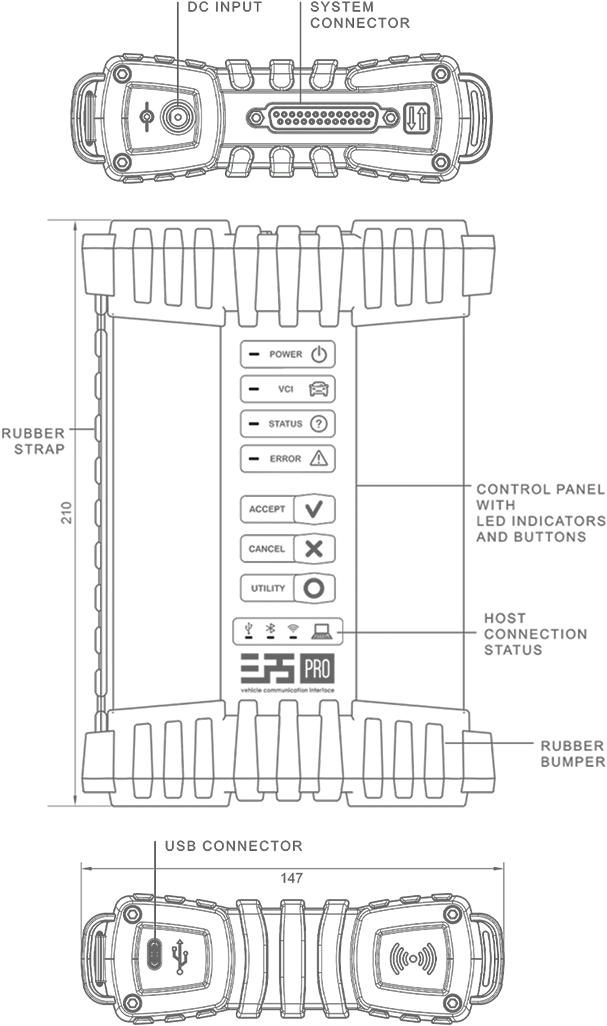
A NEW GENERATION OF VEHICLE COMMUNICATION
A professional vehicle communication interface built for OEM diagnostics, ECU programming, coding and flashing — in the workshop and beyond.
ELP5 PRO-VCI connects a PC or Android device to the vehicle, providing stable communication during demanding diagnostic and programming operations. It offers 2 modes: Pass-Thru for vehicle programming or standalone operation with DiagProg software.

Work with OEM applications through the J2534 standard - diagnostics, programming and service functions for multiple brands.
CAPABILITIES
Built to handle the most demanding tasks in a professional workshop.

Communication with vehicle systems using professional diagnostic software.
A stable connection during programming and control module operations.
Vehicle function configuration and coding supported by the selected software.
Flash memory operations performed with communication and supply monitoring.
Professional workshop procedures available in supported applications.
HARDWARE & CONNECTIVITY
Modern protocols, flexible connectivity and expansion capability in one rugged interface.
CAN – 3 independent channels
UART – 3 independent serial communication channels
J1850 VPW/PWM – 1 Channel
Slot for Expansion Board for future/custom standards
Nearly unlimited configuration options support
9x Programmable Multifunction Input / Output / Bidirectional pins
Pull-ups, pull-downs, „open-drain”, Schmitt trigger options
J1850 VPW/PWM – 1 Channel
Slot for Expansion Board for future/custom standards
Nearly unlimited configuration options support
ISO 11898 – CAN-FD 5Mbps
ISO 11898-3 – Fault Tolerant CAN
ISO 15765 – Diagnostics on CAN
ISO 13400 – DoIP
ISO 14230 – KWP2000
ISO 14229 – UDS
ISO 9141 – K & L Lines
SAE J2411 – Single Wire CAN
SAE J2818 – KWP1281
SAE J2819 – TP2.0
SAE J2284 – High-Speed CAN
SAE J2740 – GM UART
SAE J1850 – VPW/PWM
SAE J2610 – Chrysler SCI
SAE J2809 – Honda DIAG-H
Chrysler CCD
SAE J2534 is a standard interface between a PC and a vehicle. A Pass-Thru device works as a gateway between the vehicle's control units (ECUs) and the manufacturer's software on your computer.
SOFTWARE
Take full control of your ELP5 PRO-VCI with the free ELP Pass-Thru Link application. Easily manage activation, J2534 driver setup, firmware updates and device diagnostics - all in one place, with no account or login required.
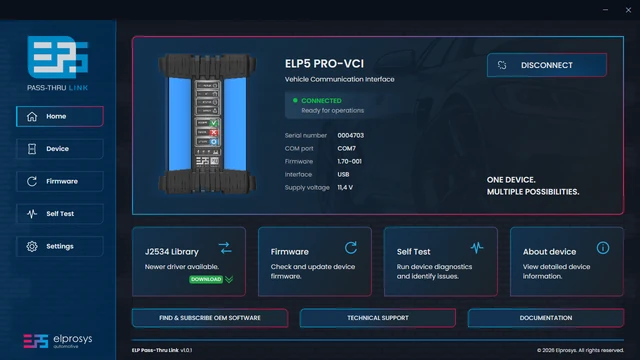
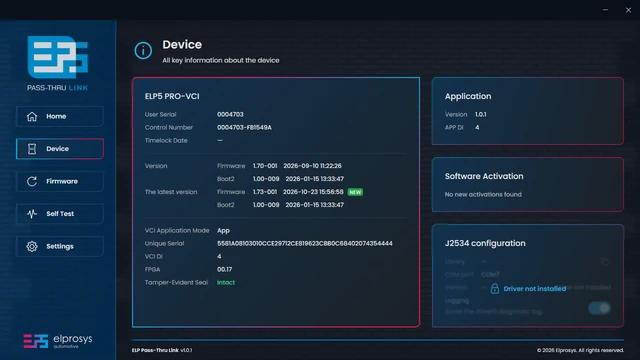
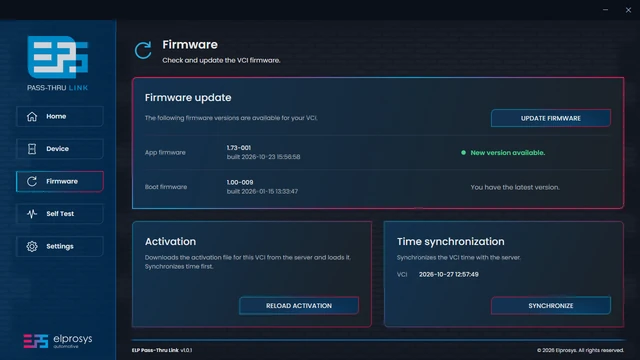
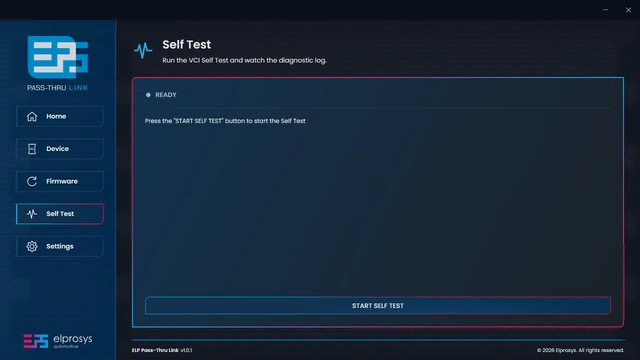
Downloads and activates your VCI using the Elprosys server. Requires an internet connection for first-time setup.
Installs and configures the J2534 driver, enabling communication between your VCI and OEM diagnostic software.
Updates your VCI firmware to the latest available version. Requires an internet connection and a connected device.
Runs built-in VCI diagnostics to check device operation and displays detailed test results in a log.
4 steps from unboxing to the first session in OEM software.
Download and install the ELP Pass-Thru Link app on your Windows 10 or 11 PC (64-bit system required).
Download ELP Pass-Thru Link →Connect ELP5 PRO-VCI to the vehicle's OBD port and your PC. Open Firmware → Activation in the app (internet required).
Use the J2534 Library tile on the app's Home screen. Windows asks for administrator rights.
Buy a subscription from the carmaker and select ELP5 PRO-VCI as the J2534 device.
Where to buy OEM software →ELP5 VCI-PRO System
Full specifications, protocols, connectors, dimensions and product documentation.
More about ELP5 PRO-VCI SOFTWAREApplication features, activation, J2534 driver installation and download information.
More about the software HELPAnswers to common questions, setup guidance, documentation and technical support.
Open FAQ & SupportYes. OEM diagnostic and programming software is licensed by the vehicle manufacturer, usually as a subscription on the manufacturer's service portal. ELP5 PRO-VCI is the interface the software uses. See where to get OEM software.
[TODO: verified list of OEM applications]
Functionality depends on the OEM software subscription and on support for the specific vehicle.
Windows 10 and 11, 64-bit. Installing the J2534 driver needs administrator rights, and Activation needs an internet connection. The OEM software may have its own PC requirements, so check them too.
Write to us through the contact form or at office@elprosys.com. Describe the vehicle, the OEM software and what happened.


